

Apple Pay has exploded across e-commerce in the last two years, processing an estimated 12 billion transactions in 2024 alone (Statista) and consistently outperforming card checkouts on conversion and fraud. For Curacao-licensed casinos hunting for friction-free deposits—especially from iOS-heavy markets such as Scandinavia, Japan, and the Gulf states—offering Apple Pay is quickly shifting from nice-to-have to must-have.
Yet implementing Apple Pay inside a regulated iGaming cashier is more involved than dropping a generic Pay now with Apple Pay button. You have to tick scheme rules, regulator expectations, and wallet-ledger nuances without bloating your 3-second checkout target. The following technical checklist distils everything an engineering or product lead needs to launch Apple Pay under a Curacao licence in 2025.
1. Confirm PSP & Scheme Compatibility (Before Writing a Line of Code)
- Verify that your payment service provider (PSP) supports both:
- MCC 7995 (betting & wagering) and
- Apple Pay token rails for VISA, Mastercard, Amex, and local networks you plan to accept.
- Request a written statement from the PSP’s acquiring bank confirming Apple Pay support for Curacao-licensed merchants. Some acquirers still geo-gate high-risk MCCs when the licence is offshore.
- Double-check scheme surcharge rules—e.g., VISA Europe bans separate Apple-Pay processing fees. Fold any fee delta into your hold-back model.
Spinlab tip: our Hybrid Cashier auto-routes Apple Pay tokens to the lowest-cost PSP in real time based on BIN, risk score, and currency.
2. Enrol in Apple Developer & Generate Core Credentials
| Credential | Purpose | Where It Lives | Renewal |
|---|---|---|---|
| Apple Developer Account | Grants access to identifiers & certs | Apple Developer portal | Annual fee (US$99) |
Merchant ID (merchant.com.<brand>.casino) |
Identifies you in Apple Pay flows | Shipped in JS / iOS code | Persistent |
| Payment Processing Certificate | Allows decrypting payment tokens if you handle them server-side | Keychain / HSM | 25 months |
| Apple Pay Merchant Domain File | Domain ownership proof (/.well-known/apple-developer-merchantid-domain-association) |
Web root of every cashier domain | Update when adding domains |
Pro tip: Store the private key for the processing certificate inside a hardware security module (HSM) or your PSP’s vault. Never compile it into front-end code or mobile apps.
3. Add Domain Verification & Expect Sub-Domain Gotchas
Apple Pay Web requires HTTPS on every cashier domain (and sub-domain) that hosts the payment sheet. Deploy a valid TLS certificate (TLS 1.2 min) and drop the apple-developer-merchantid-domain-association JSON file in the /.well-known directory. If you localise lobbies (e.g., jp.yourcasino.com) verify each sub-domain individually.
4. Build the PKPaymentRequest Correctly
Whether you integrate via Apple Pay JS or PassKit on iOS, populate these key fields:
merchantIdentifier: Your Merchant IDcountryCode: ISO 3166 (e.g.,CWstill acceptable for Curacao licence even if players are remote)currencyCode: The player’s wallet currency (USD,EUR,JPY…)supportedNetworks:visa,masterCard,amex, plus any regionals (e.g.,discover,maestro)merchantCapabilities: Always include3DSto satisfy SCA/PSD2 for EEA playerstotal: Label set to your casino brand; amount decimal with two digits
Send only one line item (total) to keep the sheet uncluttered and avoid rejection for gambling terminology in labels.
5. Decide Who Decrypts the Token
Apple returns an encrypted paymentData blob. You have two options:
- PSP Decrypts (90 % of casinos)
- Simplest. Forward token as-is to PSP
- Reduces PCI scope to SAQ A
- Merchant Decrypts
- You must store payment certificate, perform AES/GCM decryption, and forward PAN + cryptogram to PSP
- Increases PCI scope to SAQ D and requires HSM or secure enclave
Unless you’re building an in-house PSP, choose option 1.
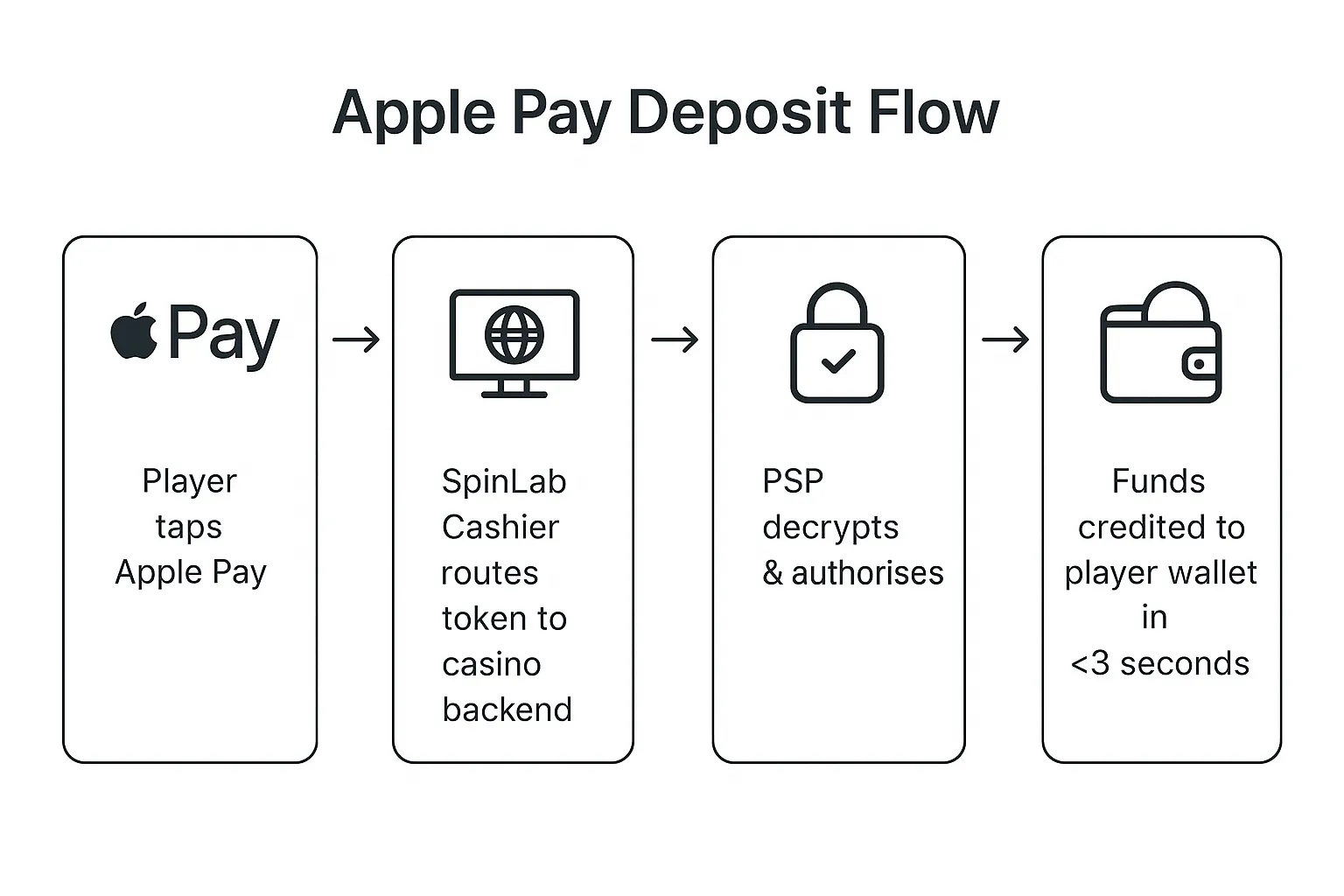
6. Map Authorisations to the Player Ledger in Real Time
A successful Apple Pay auth must instantly credit the in-platform wallet to avoid bounce-outs. Recommended flow:
- Receive PSP webhook (or synchronous response) →
- Idempotency check (
transactionId+ wallet GUID) → - Credit player balance in ledger service →
- Persist external reference (
pspTxnId) for settlement
With Spinlab’s unified ledger this step averages 450 ms, easily inside a 3-second end-to-end SLA.
7. 3-D Secure & SCA: What Actually Happens
Apple Pay does a step-up 3-DS cryptogram inside the secure element. For EEA players, SCA is already satisfied and the flow stays 1-tap. However, keep these guards:
- Force
3DSinmerchantCapabilities - Return the
transactionIdfrom the PSP to your risk engine for traceability - Log exemption indicators (low-value, TRA) when supplied by issuer for audit
8. Tune the Cashier UX for 1-Tap Deposits
- Detect Apple Pay availability via
window.ApplePaySession.canMakePayments()and surface the button only when supported. - Pre-fill amount fields with a smart default (e.g., last deposit or VIP tier suggestion) to cut taps.
- Keep the Apple Pay button above the fold on mobile; hide other payment options behind an accordion.
- Provide an undo snackbar so players can instantly cancel accidental top-ups without contacting support.
For deeper optimisation tactics, revisit our Cashier Conversion Hacks post.
9. Fraud & Velocity Controls Specific to Apple Pay
While Apple Pay reduces counterfeit card fraud, wallet-level abuse remains. Layer these controls:
- Device fingerprint: Hash
deviceAccountNumber+paymentToken.ephemeralPublicKeyfor repeat-offender tracking. - Velocity rules: <€2 500 daily per Apple Pay PAN to align with Curacao RG guidelines.
- Geolocation mismatch: Flag tokens where device region ≠ IP ≠ KYC country. Requires three-way join in analytics.
- Chargeback suppression: Enforce reversal to source to satisfy scheme rules; automate where possible.
Spinlab’s real-time risk engine can trigger PSD2 step-ups or dynamic limits based on these signals.
10. Multi-Currency & FX Considerations
Apple Pay always displays the merchant’s currencyCode. If your cashier supports 20+ currencies:
- Pass the player’s wallet currency in the
PKPaymentRequest; let PSP handle DCC/FX. - Store the authorised amount in both host and settlement currency for reconciliation.
- Edge case: Players with a JPY Apple Wallet paying into an EUR casino wallet. Decide whether to prompt an FX modal or decline.
11. Settlement & Reconciliation Checklist
- Funding timeline: Apple Pay funds follow the underlying network (T+1-2 for VISA). Build this into your liquidity model.
- Descriptor: Schemes require a clear DBA (no “casino” wording for some banks). Align with your PSP.
- Partial refunds: Supported via
paymentToken.transactionIdreference. Credit the casino wallet first, then call PSP. - Dispute evidence: Archive Pay Sheet screenshots and 3-DS cryptogram metadata for 13 months.
12. Compliance & Audit Logging
- Retain
paymentTokenheaders (excluding PAN) for 5 years to satisfy Curacao audit trail. - Store PSP response codes, AVS/CVV results, and 3-DS indicators in an immutable log (e.g., AWS QLDB).
- Keep Apple Pay domain verification logs and CSR history; inspectors may request proof during periodic checks.
For broader PCI implications, see our PCI DSS for iGaming: 2025 Guide.
Ready to Go Live in <30 Days?
Accepting Apple Pay under a Curacao licence is perfectly achievable—as long as you align PSP capabilities, Apple credentials, cashier UX, and compliance evidence before launch. Operators already on Spinlab’s Fullhouse platform can activate Apple Pay via a single toggle in the Payments Hub and follow this checklist as a sanity scan.
Still piecing together legacy gateways or worried about licence gating? Book a 20-minute technical demo and see how Spinlab unifies card, Apple Pay, crypto, and 40+ APMs behind one hybrid cashier—so you can focus on acquisition, not payments plumbing.